
Published 2026-10-10 · DIYCarPlay Engineering Team
The Rear Camera Stays: How a CarPlay Retrofit Module Keeps the Factory Reverse Path Alive
A CarPlay retrofit module is inserted into the video link between a factory head unit and its factory screen, which means the factory reversing camera ends up passing through a third-party box every time the driver selects reverse. The module therefore carries two jobs at once: it brings a phone interface to the display, and it stays out of the way of a safety-related video path the driver has no alternative for.
The second job is where installation complaints concentrate. A module that switches the display at the wrong moment, or fails to hand the screen back to the head unit when reverse is released, turns an otherwise clean install into a return. What follows sets out what has to happen electrically for a factory reversing camera to keep working after a retrofit, and what an installer or distributor should verify before accepting a batch.
What happens to the camera signal when a module sits in the middle
On most factory platforms built before CarPlay existed, the head unit sends a serialised video signal to the screen over a twisted-pair LVDS cable, and the reversing camera reaches that head unit as a separate analogue composite video line. The head unit switches its output to the camera feed when the reverse trigger arrives, draws the parking guidelines over it, and switches back when reverse is released. The background to that arrangement is set out in the Wikipedia entry on the backup camera, which also covers why the image is mirrored and why the guidelines are a head unit function rather than a camera function.
Wireless CarPlay sits on top of that arrangement rather than replacing it. Apple's own CarPlay support page describes the phone-side requirements; none of them touch the reverse path, which is why adding the interface can leave the camera exactly as it was.
A retrofit module taps into the same LVDS cable. The original screen connector comes off, the module's LVDS input goes to the head unit side and its LVDS output goes to the panel side, and from that point on the module decides in real time which source the panel displays. The factory camera itself is usually untouched. Its composite line is passed through or re-terminated at the module, and the camera draws power from the reverse lamp circuit rather than from a new supply.
Keeping the original camera also keeps the factory guideline overlay. The guidelines are drawn by the head unit using the geometry of the factory camera, not by the camera module, so replacing the camera changes the overlay calibration and the parking reference the driver has learned to rely on.
The two wires that decide whether the camera wakes
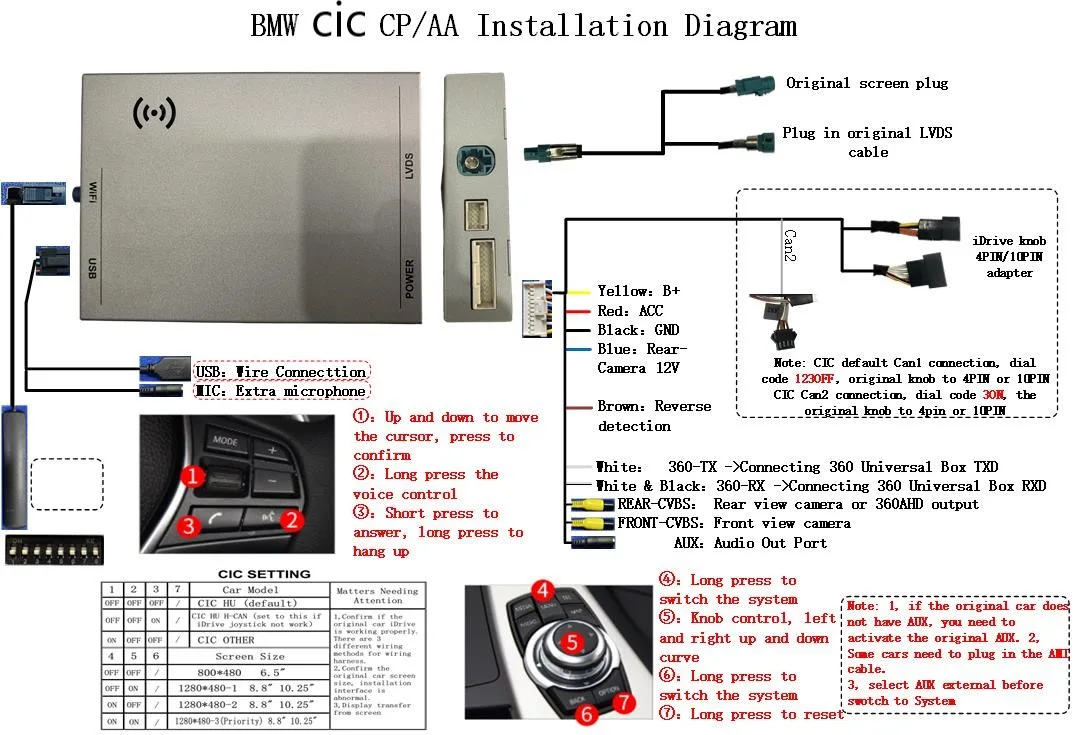
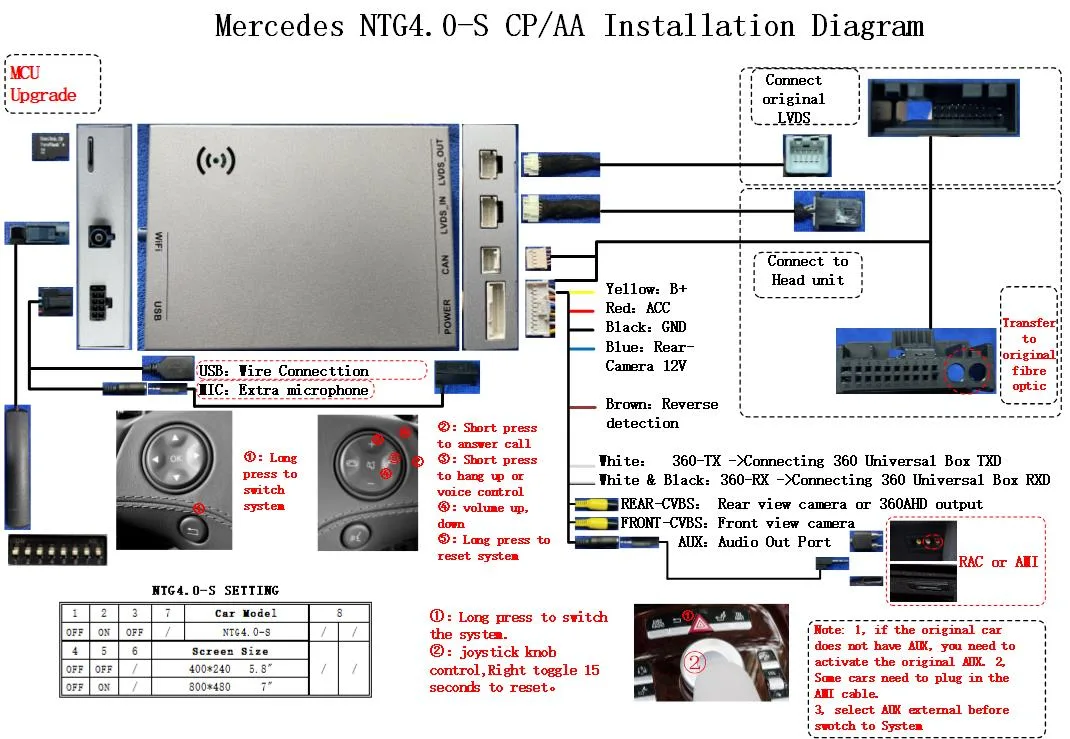
Install diagrams for these platforms label the same two conductors over and over. One is listed as rear camera 12V, the other as reverse detection. Between them they determine whether the camera image ever appears.
- Rear camera 12V — supply taken from the reverse lamp circuit, so the camera wakes the moment reverse is selected, exactly as it did before the module was fitted.
- Reverse detection — the signal that tells the module the vehicle is in reverse, so the panel is switched to the camera source without waiting for the phone to negotiate anything.
- LVDS in and LVDS out — the two halves of the serial link, one to the head unit and one to the panel. These are not interchangeable.
- Car model and screen size DIP block — the timing and resolution profile the module applies to the panel.
Leave the reverse detection wire unconnected and the usual symptom is that no camera picture appears while the phone interface is running, because the module never receives the instruction to leave it. Feed the camera 12V wire from a permanent supply instead of the reverse lamp circuit and the symptom reverses: the camera image turns up at moments the driver did not ask for, and the head unit may report an unsupported input on wake.
Composite camera input versus a camera carried over LVDS
Not every platform routes the camera the same way. On the NTG4.0 generation shown above, the harness exposes a dedicated rear view camera input, a front view camera input and an audio output, with reverse detection on its own conductor. On other generations the camera reaches the head unit as an LVDS stream from the rear seat electronics, and the head unit is the only device that knows how to render it.
That distinction matters for sourcing. A module expecting a composite camera input cannot recover a camera that arrives as an LVDS stream further down the chain, and the harness supplied alongside the module determines which case applies. Distributors who stock one harness and assume it covers a model year produce most camera-related returns.
| Camera routing | Where the signal is taken from | What the harness must expose |
|---|---|---|
| Composite to head unit | Rear camera harness behind the head unit | Rear view camera input plus camera 12V and reverse detection |
| Composite via trunk harness | Camera cable running through the boot | Rear view camera input and a ground reference |
| LVDS from rear electronics | Rear seat module or camera control unit | LVDS pass-through with reverse detection driven separately |
| Camera in the display mirror | Factory mirror electronics | Not addressable at the head unit; the original mirror stays in charge |
What goes wrong, and why
| Symptom | Likely cause | Resolution |
|---|---|---|
| No camera image when reverse is selected, phone interface otherwise normal | Reverse detection wire not connected | Connect the reverse detection conductor and repeat the test from a cold ignition cycle |
| Camera image appears without guidelines | Non-factory camera in the circuit, or head unit in video source fallback | Confirm the original camera is fitted and the composite line is terminated at the module input |
| Camera image persists after reverse is released | Panel not handed back to the head unit source | Verify LVDS in and out at the correct connector; a reversed pair leaves the panel lit but blank |
| Camera works with the phone disconnected but not connected | Module initialisation slower than the reverse trigger | Update module firmware and confirm the trigger is asserted before the panel changes source |
| Display shows a frozen frame after the car is locked | Panel sleep timing differs from the head unit | Set the correct screen size and timing profile on the DIP block for that platform |
Where Linux embedded and an automotive-grade chipset change the outcome
The handoff back to the factory screen is a timing problem as much as a wiring problem. When reverse is released the module has to return the panel to the head unit promptly and then stay available for the next phone connection.
A general-purpose operating system accumulates cached applications and background processes, and the time it takes to complete a display source switch becomes less predictable as that cache grows. Linux embedded does not accumulate an application cache in the first place, so the switch timing in a car that has been driven for five years matches the timing in one that left the factory that morning.
The automotive-grade part of the chipset matters for a separate reason. The camera path is live while the vehicle reverses at low speed, and the module sits inside a dashboard cavity that can reach high ambient temperature. Temperature tolerance and repeatable interrupt behaviour are what keep the source switch consistent when the cabin is hot and the LVDS run is long.
What 5GHz dual-band WiFi has to do with the camera
Less than it first appears, and that is the point of keeping the two paths apart. The camera path is analogue composite video over a shielded cable; the phone interface is a wireless link. Because they never share a conductor, congestion on the wireless side cannot degrade the camera image, and the camera's switching events cannot interrupt video streaming.
The dual band matters on the phone side. 2.4GHz reaches further and penetrates dashboard metal better, which helps when the head unit sits between the phone and the antenna. 5GHz carries more bandwidth and occupies a less crowded part of the spectrum, which matters in multi-storey car parks where dozens of 2.4GHz networks overlap. Carrying both bands lets the link associate quickly in a crowded environment rather than stalling on a congested channel, and it keeps latency low enough that the display feels connected rather than remote.
What to verify before accepting a batch
- Reverse detection asserted and camera 12V present, measured at the harness rather than assumed from a successful power-up.
- Camera image present both with a phone connected and with the phone disconnected.
- Panel returns to the head unit source after reverse is released, repeated over at least ten cycles.
- Guideline overlay renders, which confirms the factory camera is still the one in the circuit.
- LVDS in and out confirmed at the correct connector, since a reversed pair produces a lit but empty screen.
- Firmware version recorded per unit against the vehicle platform it was tested on.
Platform coverage is listed by head unit generation on the compatibility page, which is the level at which camera routing is actually consistent. Model years alone are not a reliable guide, because a facelift can change the camera input while leaving the screen size untouched.
Ordering terms for distributors
Stock is available from 10 pcs, and mixed models are allowed in a first order so that a distributor can test several vehicle platforms before committing to volume. Private label production starts at 500 pcs per model, and a full OEM programme with customer firmware starts at 1000 pcs per model.
Samples take 7 to 15 days including DHL or FedEx. A large-volume order of 500 pcs or more takes 15 to 20 days, and quotations come back within 12 hours. Terms are 30% deposit with the balance settled against a copy of the bill of lading, by T/T or PayPal. The sample fee is deducted from the first large-volume order.
Vehicle-specific harnesses are usually the constraint on lead time rather than the module itself. For platforms where the harness is already tooled, such as the BMW range, a first order can ship against stock. Volume tier details are on the wholesale page.
Frequently asked questions
Does the factory reversing camera have to be replaced?
No. On the platforms covered here the original camera, its housing and its wiring stay in the car. The module passes the camera signal through and supplies it from the reverse lamp circuit.
What happens to the parking guidelines?
They are drawn by the head unit, so they stay as the factory intended provided the original camera remains in the circuit. A different camera changes the calibration.
Can the camera image be called up while the vehicle is moving forward?
The reverse trigger is what normally raises the camera image. Some platforms also pass the camera through on demand, and on those the module can present it while stationary. Forward-facing video is a separate question and depends on the platform.
Does the module suit a car with no factory camera at all?
Adding a camera to a car that never had one is a different job, involving a display input the head unit may not expose. Those vehicles need the camera question answered before a module is quoted.
Which platforms route the camera over LVDS rather than composite?
Several later generations hand the head unit an LVDS stream from the rear electronics. The harness supplied with the module indicates which input applies, and the platform list should be checked before an order is placed.
How is a module configured for a specific vehicle?
Through the car model and screen size DIP block on the harness, combined with the firmware version matched to that head unit generation. Both are recorded per unit at the test station.
Send the vehicle list, quantities and target market through the inquiry form. We reply within 12 hours with the module, harness and firmware combination for each platform named, the volume tier that applies, and the lead time for that harness. Samples are the sensible first step where camera routing differs between model years.
Need the Module From This Guide?
Wholesale from 10 pcs (mixed models OK), samples in 7–15 days (DHL/FedEx express). Fitment confirmation within 12 hours.
Request Pricing Check FitmentRelated Resources
- CarPlay Collections — browse by marque family (German, British, Italian, Japanese, luxury)
- CarPlay Fitment Checker — find the module for your car
- CarPlay Decoder FAQ — 34 answers on compatibility, install and wholesale
- CarPlay Retrofit Buying Guide — platform identification & selection
- Wholesale, Private Label & OEM Program — MOQ, lead times, payment terms
- All installation & technical guides