
Published 2026-10-07 · DIYCarPlay Engineering Team
Keep the Steering Wheel Buttons and the Rotary Knob: What a CarPlay Retrofit Module Leaves Unchanged
A CarPlay retrofit module is a small Linux-embedded unit fitted behind the factory head unit, wired into the display and power lines of a vehicle that never shipped with CarPlay. It adds wireless CarPlay to the existing factory screen. The dashboard, the panel and the car itself are not altered.
The first question in almost every workshop is narrow and practical: after the module goes in, do the steering wheel buttons still work? The volume rocker, the voice shortcut, the telephone key, the rotary controller by the gear lever. Does the reversing camera still come up when reverse is engaged? Those functions live on the vehicle network rather than inside the head unit software, which is why the answer depends on how the module was wired, not on what the module claims to offer.
What the steering wheel buttons are actually wired to
Steering wheel controls are not accessories. Each one is a switch in the steering wheel hub that reports a press and a release, and on most platforms built from the 2006 model year onward that report travels over CAN bus — the same vehicle network described in the CAN bus documentation on Wikipedia. The head unit receives the report and decides what it means. Volume up raises the audio, the voice shortcut opens whatever the car has bound to it, the telephone key takes or ends a call.
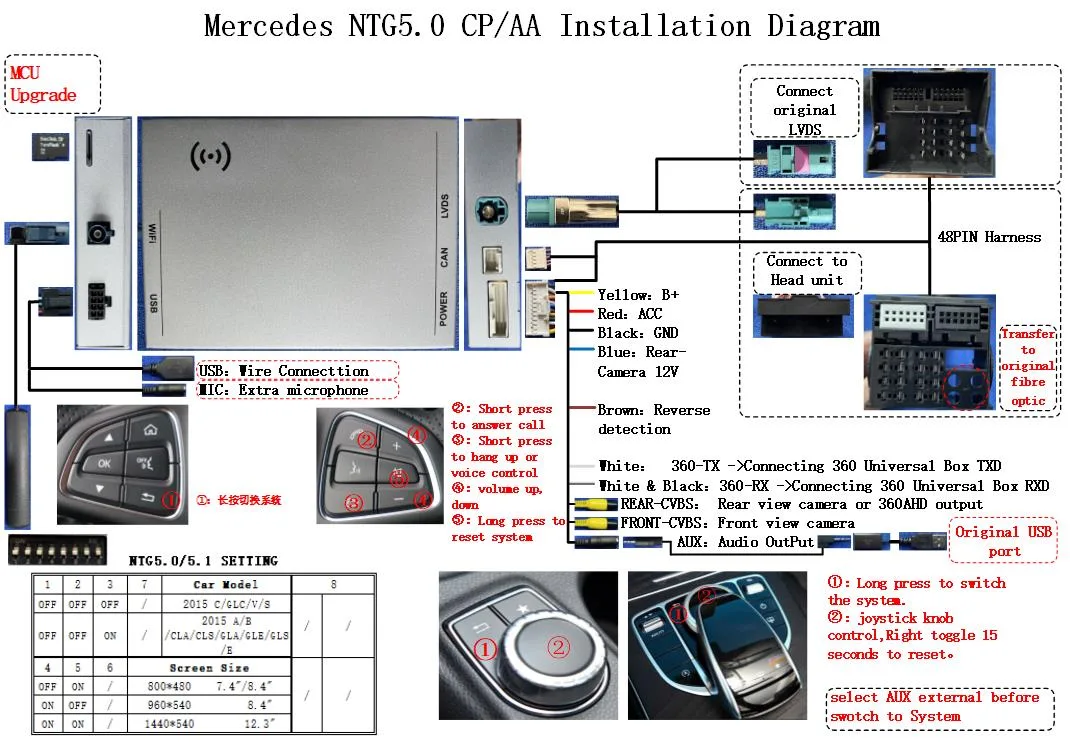
That division of labour is exactly what makes a retrofit possible. A module that taps the display link and the power supply, and joins the network for wake and reverse-trigger lines, never interrupts the circuit between the buttons and the head unit. Nothing is cut, nothing is re-terminated, and no switch has to be taught to anything. The button still closes, the report still arrives, the head unit still acts on it — the same behaviour as before the module was fitted.
The functions that break first when a retrofit is done badly
Most problems reported after a retrofit installation come down to three habits: taking a feed from the wrong pin, interrupting the network to power the module from the head unit's accessory line, or sharing a ground with something that draws intermittently. Each of those shows up as a function that used to work and no longer does.
| Function | Where it actually lives | After a correct install |
|---|---|---|
| Steering wheel volume and voice keys | Switch reports over the vehicle network, interpreted by the head unit | Unchanged |
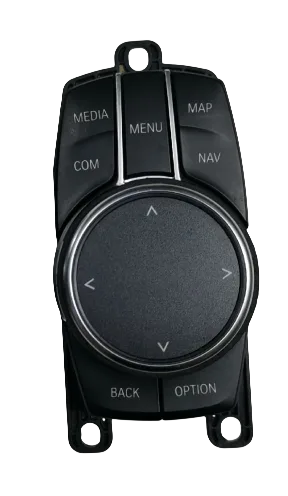
| Rotary controller (iDrive, COMAND, MMI) | Its own connector at the head unit, often a 4-pin or 10-pin device | Unchanged; the knob is never re-programmed |
| Reversing camera | Reverse trigger line from the body harness | Unchanged; the car triggers it |
| Factory screen and its own menu | Display link between head unit and panel | Panel stays; the factory menu remains reachable |
| Parking sensors and chimes | Chassis electronics, not the head unit | Unchanged |
Coverage across the range matters here, because a button set, a knob connector and a reverse trigger line all differ between generations of the same nameplate. Modules are built for named head unit platforms rather than for model names, and the vehicle fitment finder maps a car to the platform it uses. A specific example: the NTG4.5 head unit carries its own connector layout and screen timing, which is a different build from the NTG4.5 platform listed here and from every other generation around it.
Where the module's own button handling comes from
The keys are not decorative once a module is in the car. On these units the steering wheel voice shortcut is re-purposed for call handling: a short press answers, a long press ends the call, and the caller's voice is routed through the factory speakers without a separate microphone or amplifier being added to the vehicle.
Wake-up is handled on the network as well. The module listens for the bus activity the head unit produces when a door opens or the ignition state changes, wakes, and is ready before the driver reaches for the controller. A retrofit that instead needs a hidden switch or a specific sequence of button presses is solving a problem the vehicle network already answers. The installation walkthrough covers the physical steps in order.
The rotary controller is the tell
The knob by the gear lever is where a well-engineered retrofit and a cheap one separate visibly. On BMW CIC the iDrive controller is a four-pin device on a branch of its own; on later NBT units the same physical knob uses a ten-pin connector. In both cases the head unit identifies the controller and drives it. A module that keeps the factory connector in place leaves the knob behaving as the car delivered it — rotating to scroll, short press to select, long press to back out.
The alternative is a module that has to be taught the controller, or an adapter configured per car before the knob responds at all. That converts a fitting job into a support job: every car that behaves slightly differently becomes a troubleshooting case for the installer rather than a finished delivery.
Where the chipset and the operating system show up
Button response feels immediate or it does not, and the difference sits in the time between the report arriving over the network and the frame appearing on the panel. That path runs through the module's own processor, so the processor and the software on it decide whether a press registers at once or after a beat.
These modules run a fixed-function Linux system on an automotive-grade Sunplus chipset. A defined task set with no accumulating background work keeps frame pacing predictable. An Android-based head unit runs a general-purpose operating system designed around app installs. That design brings background processes, and background processes accumulate. A unit that starts responsive tends to feel slower after months of daily use, with cached data building up until behaviour depends on how much has been installed and used. This is a documented characteristic of that platform, not a fault in any individual unit, and it is the reason a factory head unit that has been in a car for ten years can still feel quicker than a newer screen with a general-purpose system.
Why the 5GHz band matters once CarPlay is running
With the module fitted, the phone no longer talks to the car over a cable or over the vehicle network. It talks to the module over WiFi, and that radio becomes part of how responsive the car feels. These modules carry a dual-band radio, 2.4GHz and 5GHz. The 2.4GHz band reaches further and loses less through walls and floors, which is why it holds a connection in an underground car park. It is also the crowded band — apartment buildings, garage ventilation fans, neighbouring vehicles all sit there. 5GHz carries more data in the same width, so scrolling a long list, panning a map or starting guidance produces a response sooner. Apple's CarPlay support documentation describes the requirements on the phone side of that link.
What to check on a test drive before the job is signed off
A ten-minute drive covers more than an hour on the bench. Installers who run this sequence before handing the car back tend to avoid most callback work:
- Turn the volume rocker up and down with CarPlay on screen. The level should follow the car's own scale rather than jumping to a fixed step.
- Short-press the voice key, then long-press to end a call, and confirm voices are picked up without echo in the cabin.
- Rotate the controller through a long CarPlay list, then short-press to open an item and long-press to go back.
- Engage reverse and confirm the camera image appears and clears again on leaving reverse.
- Open the factory menu from the panel and confirm it still comes up alongside CarPlay.
- Drive out of an underground car park and confirm the connection re-establishes without a manual re-pair.
Common questions
Do the original steering wheel buttons work after a CarPlay retrofit?
Yes, provided the module was wired without interrupting the circuit between the buttons and the head unit. The buttons report over the vehicle network and the head unit interprets them, so as long as that path stays intact the original behaviour is unchanged. The voice key is normally re-assigned to answer and end calls.
Does fitting a module mean losing the factory screen or the factory menu?
No. The panel, its resolution and its brightness stay as the car left the factory, and the factory menu remains reachable from the panel. The module sits behind the head unit and feeds the display that is already in the car.
Which vehicles are eligible for a retrofit?
Any vehicle whose head unit has an accessible display link and an existing factory harness, which covers most vehicles from the 2006 model year onward. The determining factor is the head unit platform rather than the badge or the model name, since several platforms are shared across brands.
Does the reversing camera still work?
Yes. The reverse trigger is read from the body's own harness line, so the camera is raised by the car exactly as before. No camera wiring is added or rerouted.
Does an installer need dealer coding or diagnostic access?
No coding step is involved. Installation is a physical connection to the factory harness plus a pairing procedure on the car side. Nothing is flashed to the head unit and no diagnostic tool is required.
Request a quotation
Send the target vehicle list with the head unit platform for each entry and the quantities being planned, and a quotation comes back within 12 hours with module fitment, lead times and the payment terms that apply. Coverage spans model years 2006 to 2025, more than 300 vehicle models and series. Stock starts at 10 pieces with mixed models allowed in a single shipment, private label runs start at 500 pieces per model, and a Full OEM firmware programme starts at 1000 pieces per model. Samples take 7 to 15 days by DHL or FedEx, and volume production runs 15 to 20 days on orders of 500 pieces or more. Terms are 30% deposit with the balance against a copy of the bill of lading, settled by T/T or PayPal, and the sample fee is deducted from the first large-volume order. The wholesale programme page sets out how the tiers work, and the inquiry form is the fastest way to get a figure for a specific vehicle list.
Need the Module From This Guide?
Wholesale from 10 pcs (mixed models OK), samples in 7–15 days (DHL/FedEx express). Fitment confirmation within 12 hours.
Request Pricing Check FitmentRelated Resources
- CarPlay Collections — browse by marque family (German, British, Italian, Japanese, luxury)
- CarPlay Fitment Checker — find the module for your car
- CarPlay Decoder FAQ — 34 answers on compatibility, install and wholesale
- CarPlay Retrofit Buying Guide — platform identification & selection
- Wholesale, Private Label & OEM Program — MOQ, lead times, payment terms
- All installation & technical guides