Published 2026-10-08 · DIYCarPlay Engineering Team
How to Add CarPlay to a VW Golf 7 With MIB1 or MIB2 Without Replacing the Factory Screen
Yes — a plug-and-play decoder module adds wireless CarPlay to a VW Golf 7 with a MIB1 or MIB2 head unit while keeping the factory screen, steering wheel buttons and reversing camera. No screen replacement, no dashboard trim cutting.
The Golf 7 (2012–2019) was built with Volkswagen’s MIB infotainment platform, and the same platform also covers the Golf Sportsvan, Passat B8, Tiguan II, Touran II, Arteon and T-Roc. Which MIB generation a car carries decides everything, because early units have no smartphone interface at all. Identifying the generation first is the whole job; the wiring step after that is routine.
A CarPlay retrofit module is a small Linux-based decoder unit that sits between the factory head unit and the factory display. It takes video from the original LVDS link, injects a CarPlay image, and passes touch input back to the phone. Audio is routed into the original amplifier, so the factory speaker set and the rotary knob keep working. Nothing about the original infotainment menu is removed — the module adds a source, it does not replace one.
Which MIB generation is in the Golf 7?
Volkswagen introduced MIB1 in the Golf 7 and the Skoda Octavia Mk3 around 2013, then rolled MIB2 across most models from late 2015. MIB2.5 and MIB3 followed from 2018 and 2020. The generations differ in screen hardware and in whether smartphone integration is present at all.
| MIB generation | Golf 7 model years | Typical screen | Factory CarPlay |
|---|---|---|---|
| MIB1 | 2012–2015 | 5.8" 400×240 | Not supported |
| MIB2 | 2015 onward | 6.5" / 7" / 8" 800×480 | App-Connect, cable only |
| MIB2.5 | 2018 onward | 8" / 9.2" HD | Wireless built in |
| MIB3 | 2020 onward | 9.2" HD | Wireless built in |
Two checks settle it in minutes. First, the physical screen size and bezel: the 5.8" MIB1 display sits in a narrow bezel, while MIB2 units came in 6.5", 7" and 8" versions with a different trim profile. Second, the button layout — MIB2 head units carry a physical MENU control and a capacitive shortcut strip where MIB1 has a row of hard keys. The definitive answer is on the head unit itself: open Settings, then System Information, and read the hardware version line.
The same information is available on a Volkswagen dealer service page from the VIN, which is the check to run before ordering anything. The full fitment list across the MIB platform is kept on the vehicle compatibility page, covering 300+ vehicle models & series from 2006-2025.
What the module does to the factory system
The install taps two factory interfaces rather than replacing anything. Video comes off the original LVDS display link, where the module sits as a pass-through, and a CAN-BUS wake line tells it when the head unit powers up so it wakes and sleeps with the car instead of staying live on the battery. Audio enters through the original amplifier input, which is why the standard speaker set, the front door tweeters and the factory subwoofer keep their own tone control instead of being swapped for a generic USB speaker.
Because the display and the amplifier are untouched, the following stay exactly as they were fitted at the factory:
- The factory screen and its original brightness and dimming behaviour
- Multi-function steering wheel buttons, including the roller and the voice shortcut
- The centre console rotary knob and its detents
- The original reversing camera, which triggers through the factory screen as before
- All factory functions — radio, navigation, parking sensors, vehicle settings, climate
Parking sensor overlays in particular are the usual casualty of a screen swap. Keeping the factory display means the sensor graphic is still drawn by the original software and still sits on top of whatever source is showing.
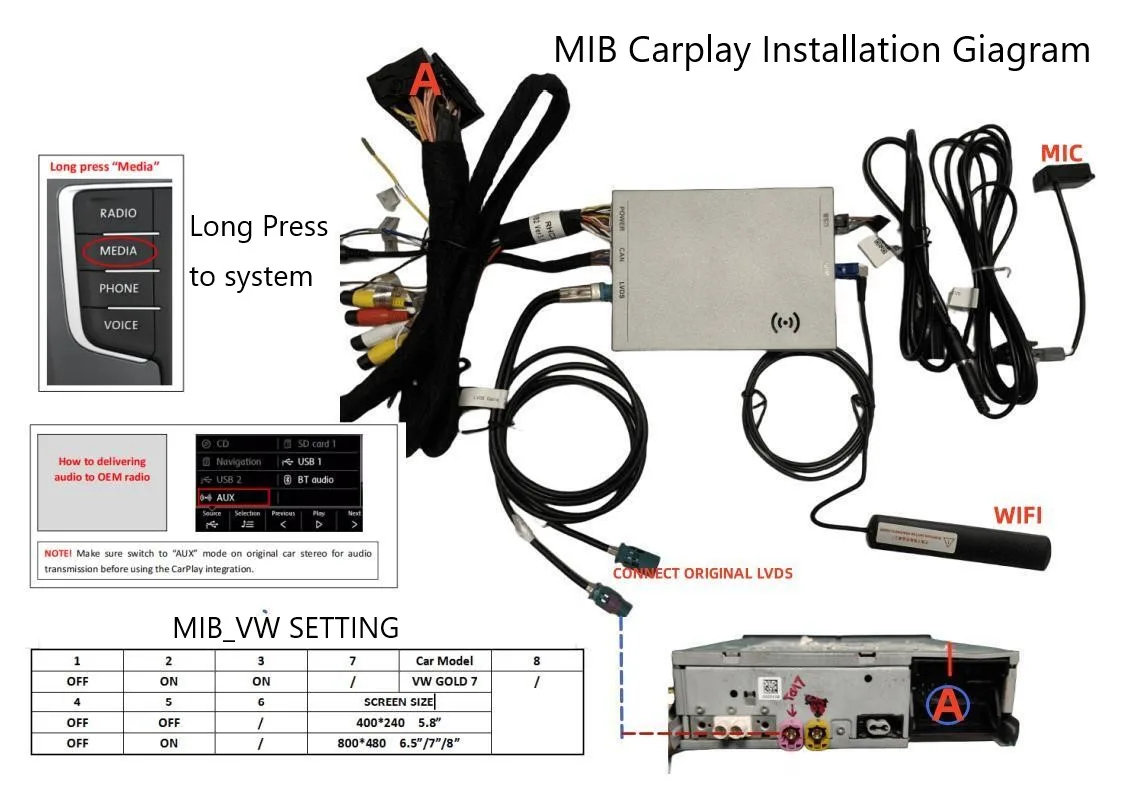
Installation steps on a MIB head unit
1. Remove the centre console trim. The MIB surround is retained on clips plus two Torx screws at the lower edge. A plastic trim tool releases the clips without marking the gloss surface. The head unit itself stays in the dash.
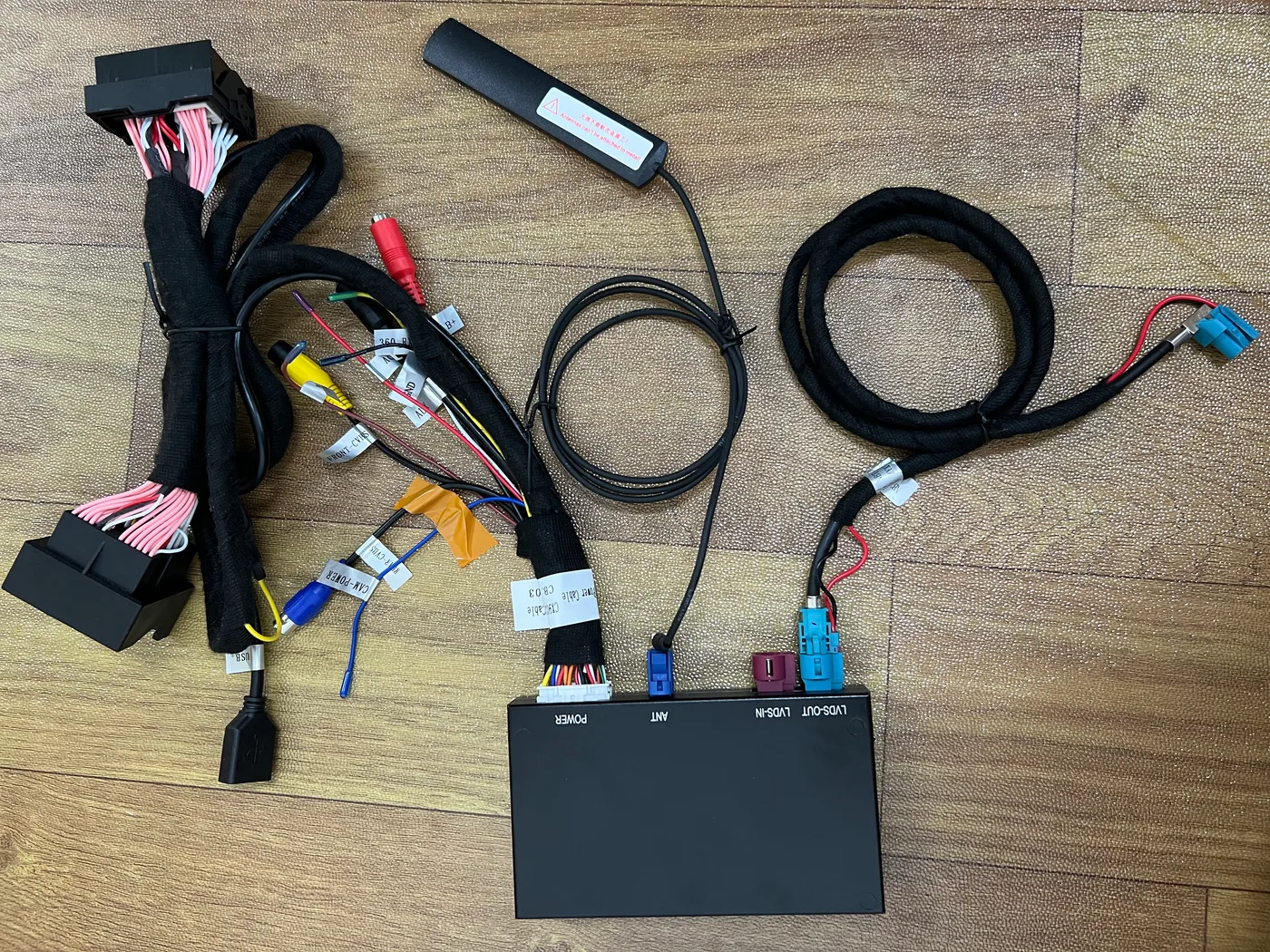
2. Connect the LVDS pass-through. The original display cable is unplugged from the back of the head unit and re-seated into the module harness, with the module’s second LVDS plug going to the display. The factory cable is not cut or spliced — it is the same connector moved one position.
3. Wire power, CAN and audio. The constant 12V, ground, CAN wake and amplifier input all come from factory connectors in the head unit cavity. The harness is keyed so it only seats one way, and every branch is labelled. No wire is spliced into an unrelated circuit.
4. Route the 5GHz antenna. This is the step that decides whether the link feels good in a car park. The 5GHz WiFi antenna should sit outside the metal dash structure — behind the A-pillar trim or above the headliner — not tucked beside the head unit. Inside the cavity it sits right against the head unit shielding, and in a multi-storey car park the difference between a usable link and a stuttering one is exactly this placement. The dual-band 2.4GHz + 5GHz radio falls back to the lower band when 5GHz congestion is heavy, and that fallback is what keeps the picture moving through a concrete structure.
5. Set the module to the head unit profile. MIB units are configured over the video link with a small on-screen table rather than a diagnostic tool. Screen size is set to match the fitted panel — 5.8" for MIB1, or 6.5"/7"/8" for MIB2 — and the source is assigned to the MEDIA or MEDIA+ button. On MIB1 units, where the MEDIA key is a hard button, a long press wakes the module; on MIB2 the capacitive strip is used. Audio routing is switched to AUX so the factory amplifier accepts the module’s audio stream.
6. Pair the phone. The module appears as a normal network device. Once paired, the phone reconnects automatically on every ignition cycle, with no cable and no menu diving.
Which approach fits which car
Three routes exist for a Golf 7, and they are not interchangeable. The right one depends entirely on the MIB generation found in step one.
| Approach | Suits | Factory screen | Wireless |
|---|---|---|---|
| USB cable to factory App-Connect | MIB2 with App-Connect enabled | Kept | No |
| Decoder module retrofit | MIB1 and MIB2 | Kept | Yes |
| Replace the head unit | Any | Replaced | Varies |
A USB cable into the factory port is free and works, but the Golf 7 has a single USB socket in the storage cubby, so the phone occupies it for the whole drive and charging stops. A decoder module removes that constraint and also covers MIB1 cars, which have no App-Connect to plug into at all. Replacing the head unit works too, at the cost of the factory screen, the original menu set, the reversing camera integration and the original amplifier control.
Fitment notes for the rest of the MIB family
The MIB platform is shared across the Volkswagen Group, so one module family covers considerably more than the Golf. Golf Sportsvan, Passat B8, Tiguan II, Touran II, Polo, Arteon, T-Roc, T-Cross, Caddy and Transporter T6 all sit on MIB1 or MIB2; the same applies to the Skoda Octavia, Superb, Karoq and Kodiaq, and to the SEAT Leon and Ateca. MIB2.5 and MIB3 cars already have wireless smartphone integration built in, so they do not need a retrofit.
Anything carrying the older RNS or RCD units is a different platform entirely — the Touareg 7P with RNS-850, for instance, runs the Audi-derived MMI3G hardware and is not part of this family. Confirming the unit before ordering avoids the one expensive mistake in this job.
Why this keeps working years later
The head unit stays Linux-based, and the added decoder is Linux embedded rather than a general-purpose phone operating system. There is no app cache to accumulate, no background housekeeping, and no thermal throttling under a long summer drive, because the module is not running a full consumer OS on constrained hardware. The decode work sits on an automotive-grade Sunplus chipset, the same class of silicon used in factory infotainment units, and that is where the headroom for the video pipeline comes from.
Across a five-year service life that difference is the return on the install: a unit that still starts as fast in 2026 as it did in 2021, and a return rate that stays low because there is no operating system to degrade. For a workshop fitting these weekly, that reliability is the difference between a profitable line and a warranty queue.
Apple’s own reference for CarPlay requirements is worth a read before buying — it sets out what a phone needs, independent of the car side: Apple CarPlay support. On the head unit side, the MIB platform’s technical background is documented at Volkswagen MIB, which covers the platform generations in more detail than most dealer documentation.
Common questions
Does the Golf 7 already have CarPlay?
Plug a cable into the USB socket in the centre console storage cubby and check whether the radio menu shows an App-Connect tile. If it does, the car already supports CarPlay over cable and needs no retrofit.
Can MIB1 be upgraded to MIB2?
Not by a software update — the hardware differs. A decoder module adds CarPlay to an MIB1 unit without changing the head unit, which is a smaller job than a head unit swap.
Will the factory reversing camera still work?
Yes. The original display stays connected, so the camera signal and its on-screen overlay are produced exactly as the factory intended.
Are the steering wheel buttons still usable?
Yes. Volume, track control and the voice shortcut are handled through the original CAN buttons, and the centre console rotary knob keeps its detents.
Does the unit support wireless CarPlay?
Yes. The dual-band 2.4GHz + 5GHz radio reconnects automatically after the first pairing, with no cable required.
Will it work with an 8-inch Discover Pro screen?
8" MIB2 panels are supported, and the screen size is set during configuration. Discover Pro units in later MIB generations already include wireless smartphone integration.
How long does the installation take?
Roughly one hour for a first-time installer including trim removal and refit. The trim clips need care at the lower edge, which is where most of the time goes.
Where to source the module
Demand for the MIB platform runs across the whole Volkswagen Group, so sellers list it in volume. Stock is available from 10 pcs with mixed models allowed, private label runs start at 500 pcs per model, and full OEM firmware programmes start at 1000 pcs per model. Samples ship in 7-15 days and bulk production runs 15-20 days above 500 pcs. Quotes come back within 12 hours, payment is 30% deposit with 70% against a copy of the bill of lading, and the sample cost is credited against the first large-volume order. The terms are set out in full on the wholesale page.
Fitment for a specific Golf 7 year and screen size can be confirmed before ordering — send the VIN or the System Information screen from the head unit and the match is checked directly. A worked reference for a different platform is in the Mercedes NTG retrofit guide, which covers the same identification logic on another platform. To check a specific vehicle, request a fitment confirmation and the unit is matched against the MIB generation before anything ships.
Need the Module From This Guide?
Wholesale from 10 pcs (mixed models OK), samples in 7–15 days (DHL/FedEx express). Fitment confirmation within 12 hours.
Request Pricing Check FitmentRelated Resources
- CarPlay Collections — browse by marque family (German, British, Italian, Japanese, luxury)
- CarPlay Fitment Checker — find the module for your car
- CarPlay Decoder FAQ — 34 answers on compatibility, install and wholesale
- CarPlay Retrofit Buying Guide — platform identification & selection
- Wholesale, Private Label & OEM Program — MOQ, lead times, payment terms
- All installation & technical guides