
Published 2026-10-28 · DIYCarPlay Engineering Team · 14 min read
Read the Version Screen: How Each Factory Head Unit Names Its Own Generation in One Photograph
Every factory head unit already knows what it is. It carries a version number, a part number and a hardware line, written by the manufacturer at the factory and visible on a menu inside the car. A buyer who can open that menu and read it has replaced an argument about model years with a fact. The method is called the version screen, and it is the cheapest piece of evidence in the whole supply chain: no tools, no diagnostic box, no removal of the head unit, and one photograph of the screen settles a question that a purchase order otherwise has to guess at.
The catch is that no two marques put that menu in the same place, and no two print the same string. Volkswagen exposes a device part number and a hardware line. Audi prints a train-version prefix that names the hardware family. Toyota publishes a model code. Mercedes writes a generation number into the software version field. A buyer who has only learned one marque's menu will misread the others, and a misread here is expensive: a decoder module addressed to the wrong head unit powers up correctly, does nothing useful, and cannot be returned under warranty because it is not a defective product. That is the reason this guide exists.
What the version screen is, and what it proves
The version screen is the diagnostic page every head unit software stack already carries. Car makers use it for their own service bulletins, and they use it the same way a workshop would: to read which hardware is fitted and which software level is installed on it. Volkswagen's technical service bulletins for the MIB head units instruct the technician to press the Menu button, open Settings, scroll down to System Information, and read the software level off the screen before deciding whether a flash campaign applies. Infiniti's service bulletins for the Q50 and Q60 infotainment system open a hidden System Diagnostic Menu by holding the audio button while turning the volume knob, then read the version information page. The same page exists on the cars a decoder is fitted to.
What the page proves is narrower than what a workshop proves and wider than what the paperwork proves. It proves the hardware generation and the software level of the unit currently in the car. It does not prove which trim the car was built in, which audio system it carries, or which accessories came off the depot line. Those sit in other places, and a version screen that is treated as a complete answer is a different kind of error from one that is never read at all.
The version screen on each marque
The table below lists the path to the version information on the marques in this catalogue, and the field that carries the generation. The paths are written as the menus appear on the car rather than as they appear in a service manual, because the sequence a technician uses and the sequence an owner uses differ by a step or two.
| Marque and head unit | Path to the version information | The field that names the generation |
|---|---|---|
| Volkswagen MIB (VW-1) | Menu button, then Settings, then System Information in System Settings | Device part number and the Hardware line, with the Software level beside them |
| Audi MMI 2G and 3G | Setup or Menu button, then Settings, then Version Information | The Software Version train prefix: the SW: line on a 2G unit, BNav_ on a 3G basic unit, HNav_ on a 3G high unit, HN+_ or HN+R_ on a 3G Plus unit |
| Audi MIB2 and MIB3 | Same Settings path, Version Information page | MHI2_ on a MIB2 unit, MHI3_ on a MIB3 unit |
| BMW CIC | Navigation menu, then Options, then Settings, then Position and map version | The map version line, which reads PREMIUM, MOVE or MOTION |
| BMW NBT | Navigation menu, then Options, then Settings, then Position and version history | The map version line, which reads NEXT |
| BMW EVO | Navigation menu, then Options, then Navigation system version | The map version line, which reads EVO |
| BMW iDrive 5 and 6 | Menu button, then Vehicle Info, then Software Information | The software version string, in a form such as NBTevo_P_ or ID6_ |
| BMW iDrive 7 and 8 | Home button, then Car, then Settings, then General Settings, then Remote Software Upgrade | The software version line |
| Mercedes-Benz NTG4.0 and 4.5 | System menu, then Settings, then System Information | The software version field, which carries the NTG generation |
| Mercedes-Benz HU6 | Same System and Settings path | The software version field on the newer interface |
| Toyota and Lexus | Settings, then System Settings, then System Info and Software Update | The Model Code, which is the first four alphanumeric characters of the System Version |
| Nissan and Infiniti | Hold the audio button and turn the volume knob left and right, then Confirmation and Adjustment, then Version Information | The software version number |
| Porsche PCM | Info, then Option, then Set PCM, then Display, then System Version | The firmware version and the map data code |
| Land Rover and Jaguar | Settings, then System Information | The installed software level |
Reading the string once you are on the screen
A version screen produces a string, and a string has to be decoded. On the Volkswagen Group units the decode is by prefix, and the prefixes are documented in the platform's own service literature and in the published MMI version format table. Audi's train-version prefixes map as follows: the SW: line with a four-part number belongs to a 2G unit; BNav_ to a 3G basic unit; HNav_ to a 3G high unit; HN+_ and HN+R_ to a 3G Plus unit; RMC_ to the basic radio unit; MHIG_ and MSTD_ to a MIB1; MHI2_ to a MIB2; and MHI3_ to a MIB3. The same prefix families recur on the Porsche and Volkswagen units, because those head units are built on the same Group platform, which is why a single decode table covers three marques.
On the Toyota and Lexus units the decode is simpler than a prefix table. The System Version field reads as a four-two-two pattern, and the Model Code is the first four characters of it. That is not an approximation, it is the definition Toyota publishes for its display audio hardware on the global infotainment system portal: the model code is the first four alphanumeric characters of the system version. A buyer who photographs that screen and reads four characters off it has identified the head unit exactly as the factory does.
On the BMW units the map version line does the work, and it has a trap worth knowing about. The map version reads NEXT on a NBT unit and EVO on an EVO unit, but the map version page does not settle which EVO revision is fitted. An F30 carries EVO ID4 and EVO ID5 units within the same body, and the software page reads EVO on both. The revision is confirmed by the VIN, not by the screen. This is the point at which a version screen stops being sufficient, and the buyer who needs to know has to ask for the VIN as well as the photograph.
Where the version screen is not the whole answer
Three things live outside the version screen, and each one has cost somebody a wrong module.
The first is the audio system. The Land Rover and Jaguar platform codes are split by screen size and by audio brand: the earliest group runs the Bose system, the later group runs Harman, and the Harman group splits again between an 8-inch and a 10.25-inch display. The software level on the screen identifies the infotainment generation but does not, on its own, settle which of those three variants is in the car. The screen size and the audio brand are visible from the driver's seat and are confirmed by the part label.
The second is the trim. A head unit can be specified with and without navigation, and the base variants on several marques run a different screen, a different audio path and a different set of connectors from the higher specification. On the BMW side this shows up as the base EntryNav2 unit, which sits alongside the navigable hardware and is not interchangeable with it. The version screen tells you what software is running; it does not tell you that the car was built without the navigation hardware.
The third is the unit itself. Some cars arrive with a head unit that has already been replaced, or with an aftermarket screen fitted by a previous owner. In that case the version screen reports the hardware currently in the car, which is exactly what a retrofit module has to match, but it is not the hardware the car left the factory with. A retrofit module is built against the unit in the car, so this case is usually benign, and it is worth knowing because the photograph and the paperwork will disagree.
Two ways to put a phone on the same screen
A decoder module behind the original display and an aftermarket Android head unit both end with a phone on a screen. They are not the same product, and the difference is settled long before anything is plugged in.
| Point of comparison | Decoder module behind the original display, Linux embedded | Aftermarket Android head unit |
|---|---|---|
| The display in the dash | The original screen stays where the car put it | A new panel takes the place of the original display |
| What runs behind it | One fixed function on an automotive-grade chipset | An operating system with an application layer and its updates |
| The radio link | Two external antennas carrying 5GHz dual-band WiFi | Antennas built into a new panel |
| Original controls | The factory controller and the steering-wheel buttons keep working | The original rotary controller is no longer there |
| Long-term behaviour | The same response after years of service | Background state accumulates across years of service |
The distinction matters here because the version screen identifies the hardware the module has to sit behind, and an aftermarket head unit removes that hardware from the equation entirely. The module runs Linux embedded on an automotive-grade Sunplus chipset, it links over 5GHz dual-band WiFi, and it sits behind the factory screen rather than replacing it, so the original display, the original controller, the steering-wheel buttons and the factory reversing camera all keep working.
What the reading is worth once it settles the code
Once the generation is settled, the order is a normal order. Stock starts at 10 pcs with mixed models accepted in the same order, private label runs from 500 pcs per model, and Full OEM firmware customisation from 1000 pcs per model. Samples ship in 7 to 15 days by DHL or FedEx, and the sample cost is deductible from the first large-volume order. Private label production takes 15 to 20 days for 500+ pcs. Quotations come back within 12 hours with volume tiers and the lead time for each platform named, and the standard terms are a 30% deposit with the remaining 70% against a copy of the bill of lading before shipment by T/T.
What the reading decides is which harness and which firmware come in the box, and that is the difference between a module that works on the first bench test and one that does not. A decoder module addressed to the wrong head unit is not a defective product. It powers up, it pairs, it draws power, and it produces nothing on the screen, because the video timing and the control protocol belong to a different generation. Warranty terms are written around defects, so that unit does not travel back under warranty. The freight on a small, light box is a large fraction of its value. The buyer keeps the dead stock, and the workshop has to open the dashboard a second time.
Frequently asked questions
Does every head unit have a version screen?
Most of them do, and the ones in this catalogue all do. What varies is whether the page is reached through a visible menu or a hidden one. The Nissan and Infiniti path is the hidden one: the diagnostic menu opens by holding the audio button while turning the volume knob, and it does not sit on the normal menu tree at all. A technician knows it, and an owner usually does not, which is why a photo request to a customer should name the path rather than ask for a screenshot of the settings.
Can a version screen replace the VIN and the build date?
No, and the BMW units show why. The version screen identifies the hardware generation, but on an EVO-equipped F30 it does not separate the ID4 from the ID5 revision, and the VIN is what confirms it. The build date on the build sheet remains the tiebreaker for a car that straddles a handover year. The screen is the strongest single piece of evidence and it is still one piece of evidence.
Why not just read the model year off the registration document?
Because the model year describes when the car was sold and the head unit describes what is fitted. Those are not the same thing on a car built across a handover, and in this catalogue fifty model names sit under more than one platform code. Ten of them carry identical model years under both codes, so the year does not even narrow the choice. The version screen closes that gap, and the reasoning behind the platform code structure is set out in the guide to platform codes and model year traps.
What if the customer cannot find the menu?
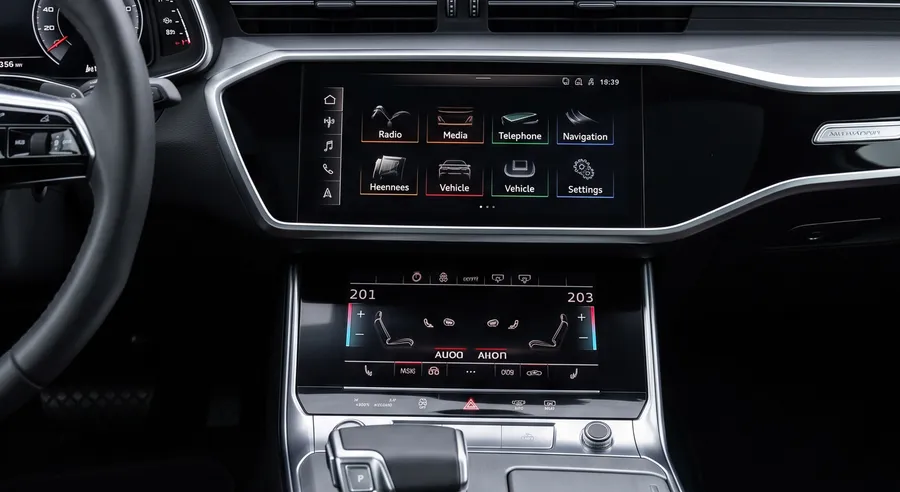
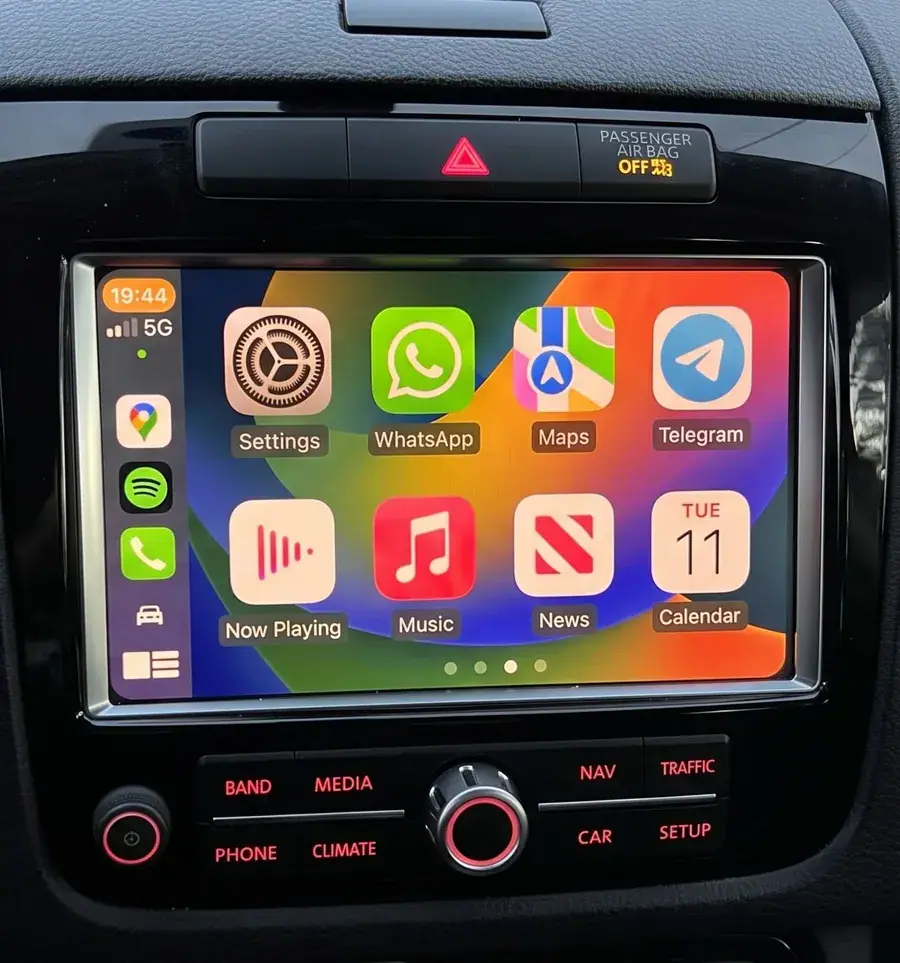
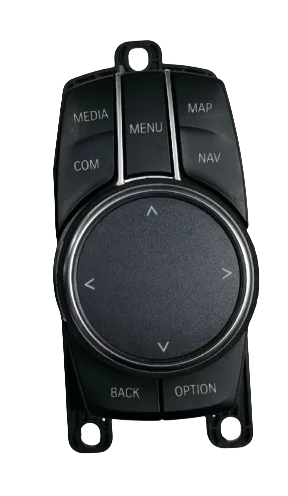
Ask for two photographs instead of one: the powered-on main menu, and the control surface. The main menu shows the interface generation, which separates a list-driven unit from a tile-driven one, and the control surface separates a touch-capable rotary controller from a plain one. Between them they narrow the generation well enough to confirm or reject a candidate code before anything is fitted. A third photograph of the physical head unit label closes the remaining cases where the trim differs.
Does the retrofit change anything the customer relies on?
The screen, the controller, the steering-wheel buttons and the reversing camera all stay as the car left the factory. The module adds the phone projection to the existing display rather than replacing the display, and the link runs over 5GHz dual-band WiFi, which is the band that holds up in a crowded multi-storey car park where 2.4GHz is congested. Nothing on the factory system is removed, and the unit can be taken back out to leave the car as it was.
How does the fitment get confirmed before an order?
The platform code is confirmed against the vehicle list, and the fitment comes back within 12 hours. For a mixed-model opening order across several codes, the vehicle fitment finder takes the vehicle list and returns the codes that cover it. Sending the vehicle list, the quantities and the target market through the inquiry form returns a quotation with the platform code, the volume tier and the lead time named for every vehicle on the list.
Next step
The version screen is available on every car in this catalogue and costs nothing but a photograph. The workable sequence is short: open the menu named in the table for the marque, read the field that carries the generation, and write the resulting code on the purchase order rather than the model name and the year. When the string and the paperwork disagree, the string describes the hardware in the car, so the order follows it. Coverage spans 300+ vehicle models and series from 2006 to 2025, and the platform code decides the harness and the firmware that ship in the box.
Need the Module From This Guide?
Wholesale from 10 pcs (mixed models OK), samples in 7–15 days (DHL/FedEx express). Fitment confirmation within 12 hours.
Request Pricing Check FitmentRelated Resources
- CarPlay Collections — browse by marque family (German, British, Italian, Japanese, luxury)
- CarPlay Fitment Checker — find the module for your car
- CarPlay Decoder FAQ — 34 answers on compatibility, install and wholesale
- CarPlay Retrofit Buying Guide — platform identification & selection
- Wholesale, Private Label & OEM Program — MOQ, lead times, payment terms
- All installation & technical guides